

DIY Smart Home Setup: Support and Hub Guide 2026
Table of Contents
- What You'll Need Before You Start Your Smart Home Setup
- Step 1: Choose a Hub That Speaks Matter, Zigbee and Thread
- Step 2: Integrating Legacy Appliances with Smart Plugs and IR Control
- Step 3: Pairing Devices from Different Brands Without Starting Over
- Step 4: How to Secure a Smart Home Network Properly
- Common Mistakes That Break a DIY Smart Home Setup
- Where to Get Smart Home Setup Support When You're Stuck
- Frequently Asked Questions
Last Updated: September 13, 2026
What You'll Need Before You Start Your Smart Home Setup
A successful smart home setup starts with four decisions, not four purchases. Most people buy devices first and then discover they've built a collection, not a system. This guide walks through the decisions in the order that actually matters, so nothing needs undoing later.
Get these wrong and you'll be replacing kit within a year. Get them right and your smart home setup will absorb new devices for years, including the ones you haven't heard of yet.
The Four Things That Decide Everything Else
Protocols. Matter, Zigbee, Thread and Wi-Fi are the languages your devices speak. A hub that supports several of them gives you far more choice later.
Local control. Devices that run automations on a hub in your home keep working when the internet drops or a manufacturer shuts up shop.
Your existing kit. Smart plugs and infrared control can bring older appliances into the system instead of sending them to a drawer.
Network security. A separate network for smart devices is the single most effective safeguard, and it takes minutes to set up.
Step 1: Choose a Hub That Speaks Matter, Zigbee and Thread
The best smart home hubs for UK users are multi-protocol models that combine Matter, Zigbee and Thread in one box. Buying a single-protocol hub locks you to one brand's ecosystem; a multi-protocol hub lets you mix devices as your needs change.
Three real options, all stocked by DigIoT:
| Hub | Price | Protocols | Best For |
|---|---|---|---|
| SwitchBot Hub Mini 2 | £79.99 | Matter, infrared, sensors | Budget builds and legacy appliances |
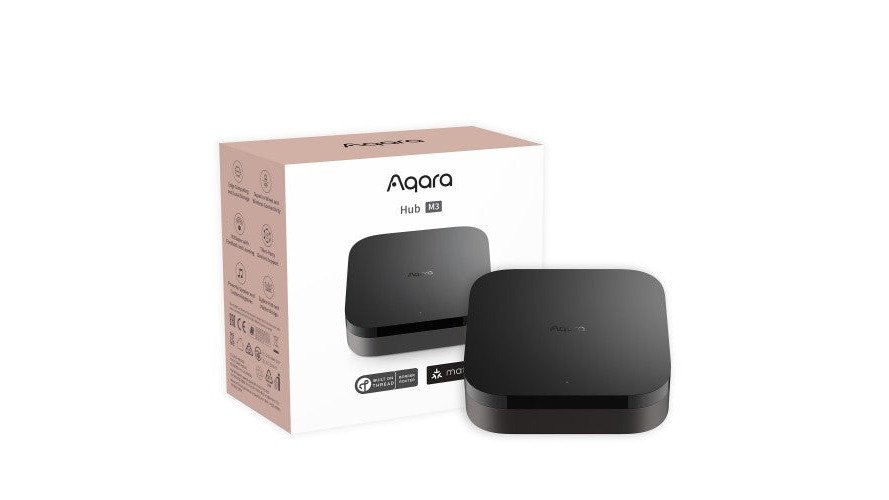
| Aqara Hub M3 | £129.99 | Matter, Zigbee 3.0, Thread | Large homes, mixed-brand setups |
| Homey Pro | £399.99 | Wi-Fi, Bluetooth, Zigbee, Z-Wave, Thread, Matter | Advanced users wanting full local control |
The Aqara Hub M3 is the sweet spot for most households. It acts as both a Zigbee coordinator and a Thread Border Router, and it handles local automations without calling home. The SwitchBot Hub Mini 2 is the better first purchase if you mainly want to control an air conditioner or television by infrared. Homey Pro is overkill unless you're running dozens of devices and want every automation processed on the device itself.

Step 2: Integrating Legacy Appliances with Smart Plugs and IR Control
Integrating legacy appliances with smart plugs and IR control is the cheapest way to modernise a home you already own. A smart plug turns any lamp, fan or heater into a scheduled device; an infrared blaster gives you remote control of air conditioners, televisions and audio gear that were never designed to be smart.
For infrared, the SwitchBot Hub Mini 2 handles both jobs at once, since it includes IR control, temperature and humidity sensing, and programmable buttons in one unit.
Step 3: Pairing Devices from Different Brands Without Starting Over
Pairing devices from different brands works when the hub, not the app, does the translating. If you already own devices from three manufacturers, you do not need to rip anything out. Add them to a multi-protocol hub one at a time and they'll appear alongside each other in a single interface.
A common mistake is pairing through the manufacturer's app first and the hub second. Where a device supports Matter, pair it directly to the hub using the Matter code. That keeps control local and avoids a second account.
If a device only supports its own app, check whether the hub has an official integration before buying anything new. Most established brands do.
Step 4: How to Secure a Smart Home Network Properly
How to secure a smart home network comes down to isolation and passwords. Put smart devices on a separate network or guest SSID from your computers and phones, so a compromised plug cannot reach your laptop.
Then work through this checklist:
- Change the default admin password on your router
- Create a dedicated Wi-Fi network for smart devices
- Enable WPA3, or WPA2 if your router doesn't offer it
- Turn on automatic firmware updates where available
- Disable remote access features you don't use
- Review each device's data-sharing settings after pairing
Local control matters here too. A hub that processes automations in your home sends less data outward than one that relies on a cloud service.
Common Mistakes That Break a DIY Smart Home Setup
Buying devices before choosing a hub is the mistake that costs the most. You end up with three apps, two bridges and no way to run a single automation across them.
Other frequent problems:
- Ignoring protocol support. A Zigbee sensor will not talk to a Wi-Fi-only hub, no matter what the listing implies.
- Skipping the separate network. Adding smart devices to your main Wi-Fi is convenient and leaves everything on one flat network.
- Assuming subscriptions are mandatory. Many cloud-dependent brands charge monthly for features that local hubs provide free.
- Overbuying at the start. Two or three devices teach you more about what you actually want than a ten-device bundle.
Where to Get Smart Home Setup Support When You're Stuck
Support is the difference between a working system and a box of half-configured gadgets. Start with the hub manufacturer's own documentation, then the community forums for your hub platform, where users have usually solved the problem you're facing.
DigIoT takes a different approach: we curate standards-driven gear and back it with plain-English setup advice, so you're not decoding jargon to get a sensor online. Because everything we stock works with Matter, Zigbee or Wi-Fi, a device you buy now will still fit your system in two years. No lock-ins, no forced subscriptions, and if something doesn't suit your setup, returns are straightforward.
That's the real argument for buying curated rather than cheapest. The kit costs roughly what you'd pay elsewhere, but you get a system that holds together.
Frequently Asked Questions
Which smart home hub is best for beginners in the UK?
It depends on how many protocols you need. The SwitchBot Hub Mini 2 is the simplest starting point because it combines Matter, infrared control, a temperature and humidity sensor and programmable buttons in one unit. If you want Zigbee and Thread as well, the Aqara Hub M3 covers those. For maximum flexibility across Z-Wave, Zigbee, Thread and Matter, Homey Pro handles everything locally.
How do I ensure my smart home devices are compatible with each other?
Buy devices that carry the Matter logo or run on Zigbee or Thread, then check that your hub supports those protocols before you buy. Matter is the cross-brand standard that lets devices from different manufacturers work together. A multi-protocol hub such as the Aqara Hub M3 or Homey Pro removes most compatibility guesswork because it speaks several languages at once.
Can I integrate legacy devices into a modern smart home system?
Yes. Infrared-controlled appliances such as air conditioners, fans and older TVs can be brought into your system with a hub that has an IR blaster, like the SwitchBot Hub Mini 2. For lamps, heaters and other plug-in items, a smart plug turns them into app-controlled devices. Neither approach requires replacing the appliance itself.
How do I keep my smart home network secure?
Put your smart devices on a separate Wi-Fi network or guest SSID, change every default password, enable two-factor authentication on your hub account and keep firmware updated. Choose hubs that process automations locally, such as Homey Pro, so less data leaves your home. If a device only works through a cloud server, treat it as a weaker link and limit what it can access.
A DIY smart home setup fails for predictable reasons: the wrong hub, mismatched protocols, or a device tied to a cloud service that vanishes. DigIoT exists to remove those failure points. We stock multi-protocol hubs like the Aqara Hub M3 and SwitchBot Hub Mini 2, offer plain-English setup guidance, and sell only gear that works without a subscription or a permanent cloud connection. Show me the goods and build a system that stays yours.